Dock mirror with live running indicators. App launcher buttons with real icons. VS Code window switcher. System actions. All in one place.
Dock mirror, app launchers, system actions, and VS Code window switching — all on one page.
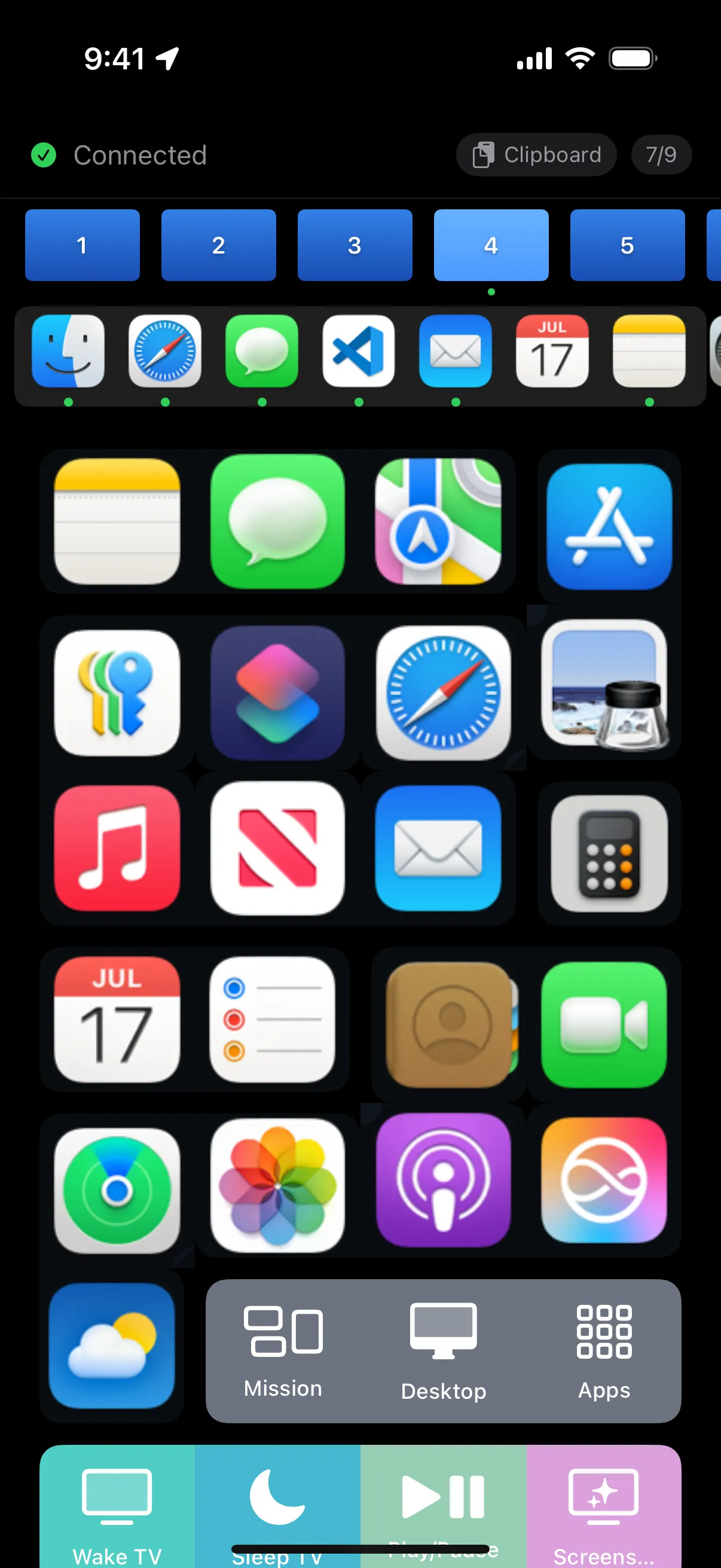
The host fetches actual macOS app icons and sends them to your iPhone. Every icon you see is the real thing.
Your Dock apps scroll across the top with live running indicators. Below, configure launch buttons for any app — even ones not in your Dock.
Mission Control, Show Desktop, Launchpad — trigger macOS system functions from the same page.
Beyond the Dock, configure buttons to launch any app by bundle ID.
- id: calculator
label: Calculator
icon: plus.forwardslash.minus
color: "#FF9500"
action: launchApp
bundleId: com.apple.calculator
# Icon-only button (no label)
- id: safari
label: ""
icon: safari
color: "#007AFF"
action: launchApp
bundleId: com.apple.Safari
com.apple.Safari
com.apple.finder
com.apple.mail
com.apple.Notes
com.apple.MobileSMS
com.apple.Terminal
com.apple.iCal
com.apple.Music
Download PromptDeck Host and launch any app from your iPhone.
Download for Mac