Tap a button on your iPhone. The prompt, snippet, or command appears at your cursor on your Mac. Works in any app. Clipboard auto-restores.
Four steps, under 50ms. Your clipboard is restored automatically.
Your current clipboard contents are saved to a temporary buffer.
The prompt text is copied to your clipboard on the Mac.
A simulated Cmd+V keystroke pastes text wherever your cursor is.
After 500ms, your previous clipboard contents are restored.
Terminal, editor, browser, Slack, email — any app where you can paste. Text appears exactly where your cursor is.
Alternative mode: Set injection.mode: keystrokes to type character-by-character instead of using clipboard.
Add {{placeholders}} to prompts and fill them with your voice.
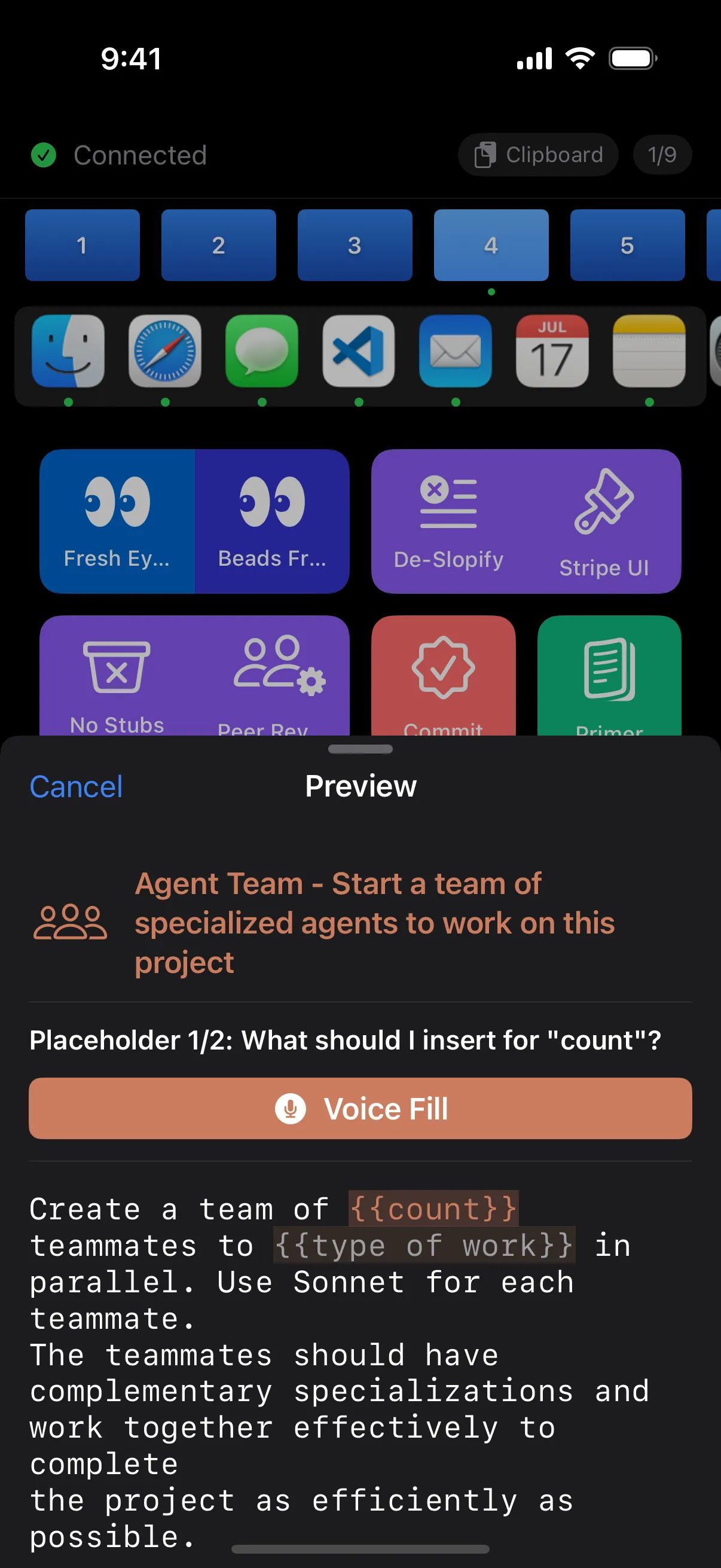
Tap the mic and speak your value, or type it manually. Mix both — whatever's faster.
Uses iOS SFSpeechRecognizer for privacy. Audio never leaves your iPhone.
See the fully assembled prompt before it's injected. No surprises.
Fine-tune injection behavior in your YAML config.
| Option | Default | Description |
|---|---|---|
injection.mode |
clipboard | clipboard or keystrokes |
injection.appendNewline |
true | Press Enter after injection |
injection.cooldownMs |
250 | Minimum ms between injections |
injection.plainText |
false | Use plain text only (no RTF) |
Download PromptDeck Host for Mac and start sending prompts from your iPhone.
Download for Mac